Converting Word or PDF documents to Fixed HTML

When you convert a document in our app, you have the option to output it as Fixed HTML. This guide explains what this format is, when to use it, and how it benefits you.

Quick Summary

Fixed HTML turns your Word documents or PDFs into web pages that look exactly like the original file. No shifted text, no missing fonts, and no broken layouts.

What is Fixed HTML?

Standard web pages are fluid; they stretch and change depending on your screen size. Fixed HTML works differently. It acts like a digital blueprint, locking every single element—images, text boxes, and margins—into an exact position.

Think of it as a PDF that opens instantly in any web browser without needing a PDF reader.

Key Benefits

  • Flawless Design: Your document looks identical on all browsers and devices.
  • No Software Needed: Anyone can view your file instantly on a phone, tablet, or computer.
  • Fonts Stay Put: Even if a viewer does not have your document’s fonts installed, the text displays correctly.

Good to Know: Editing and File Structure

To keep your layout perfectly intact, our app writes highly detailed, precise code behind the scenes.

  • Great for Viewing: This complex structure is ideal for flawless presentation.
  • Not for Heavy Editing: Because the code is so precise, making major content changes or rewriting paragraphs later in an HTML editor can be difficult.
  • Tip: Always keep your original Word or PDF file if you plan to make large text changes later.

Here is a direct comparison chart you can add to your knowledge base page to help users choose the right format.

Fixed HTML vs. Standard HTML

Feature Fixed HTML Standard HTML
Visual Accuracy 100% identical to the original PDF or Word file. Layout changes based on screen size.
Best Used For eBooks, brochures, flyers, and formal reports. Blog posts, articles, and text-heavy web pages.
Screen Adaptability Shrinks or grows like an image to fit screens. Text wraps and flows automatically to fit screens.
Ease of Editing Hard to edit; text is locked into exact coordinates. Easy to edit and rewrite using any HTML editor.
Font Consistency Looks identical even if the viewer lacks the font. Relies on the viewer’s device having the font.
Code Structure Complex code using absolute CSS positioning. Simple, clean, semantic HTML code.

🛠️ For Technical Users: Under the Hood

If you understand web development, here is how our conversion engine handles your Word and PDF files:

  • Absolute Positioning: Elements are styled using explicit CSS coordinates (top, left, width, height) to prevent responsive shifting.
  • Font Embedding: Fonts are converted and embedded directly into the file (or referenced via web fonts) to ensure cross-platform visual consistency.
  • Inline Elements: Text blocks are often segmented into specific visual spans to preserve exact tracking, kerning, and line breaks.

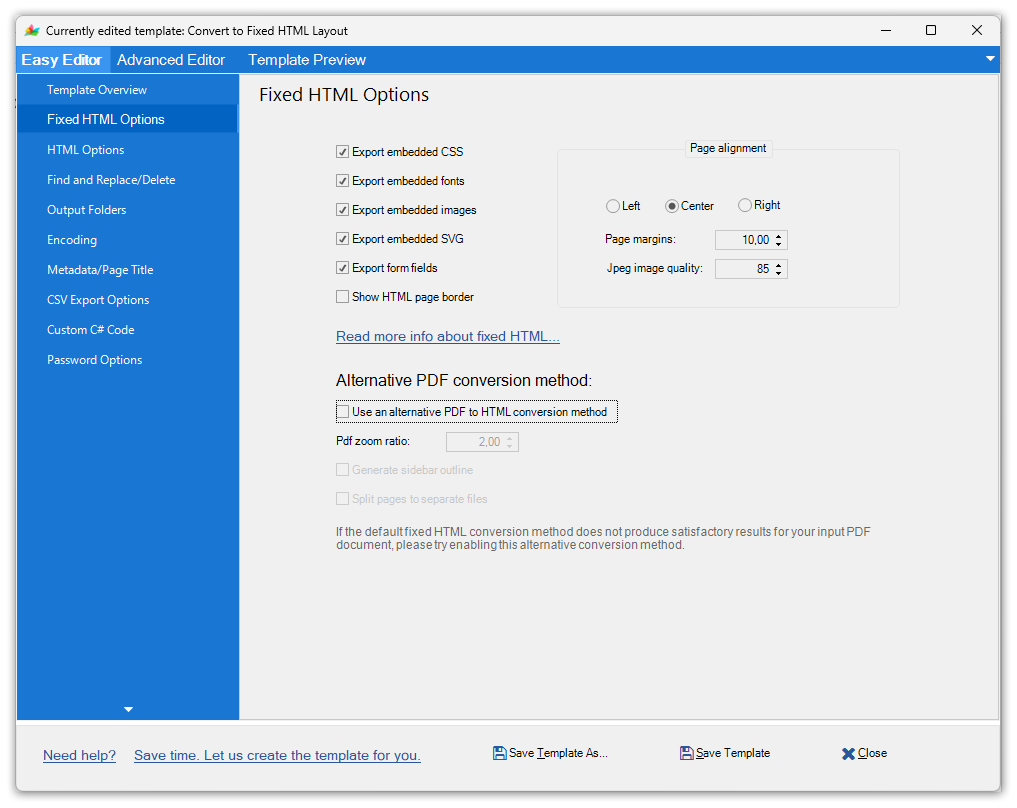
Doc Converter Pro fixed HTML options allow you to control if you want to embed CSS, fonts, images, border and alignment of the fixed HTML content.

Also, if you convert a PDF document, then you can also use an alternative (different) conversion method (second engine) to convert PDFs to a pixel-perfect visual layout in the browser.

How to merge files

All you need to do is add the files you want to merge to the file list on the main screen.

You can change the order of the files by clicking on the left of the file and dragging it up or down. Order is important as files will be merged in the order they are listed.

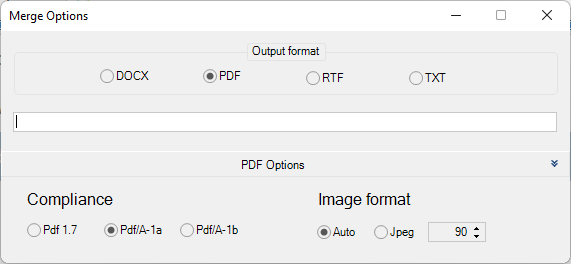
Once you are ready to merge just click the merge all button on the top menu. On the new screen, you can select the format you want to merge to. For example, you could merge 4 Word files into 1 PDF file.

You can also set the name for the merged file.

If you are merging to PDF you can click on PDF options at the bottom to get additional options.

How to choose between the Desktop or Web version…

Are you confused about which version to go for? This guide will explain the differences between the two versions. Both versions have the same features, and you can move conversion templates between the two versions.

Doc Converter Pro Desktop Version

A traditional desktop product that you install on Windows.

It has several advantages:

  • It is faster as you convert your documents locally.
  • More private. No documents leave your system so it can be the better choice if your documents are sensitive.
  • An unlimited number of conversions.
  • You can convert very big documents since there is no time limit on how long the conversion process can last.
  • You can use the Doc Converter Pro Business version via the command line or even add a custom C# code to the conversion process.
  • One-time payment (license for a given major release is perpetual).

Disadvantages:

  • The software will only work on the machine it is installed on.
  • If you are working in a team it is harder to share your documents and templates.

Doc Converter Pro Web Version

This has all the features of the desktop product except it runs online.

Advantages:

  • As it is online it will work in a web browser (Chrome, Edge, Safari, Firefox) on any computer.
  • If you are in a team you can share access which makes it easier to share documents and templates.
  • The number of conversions is limited to your subscription plan.
  • You have access to our WEB Rest API to convert documents.

Disadvantages:

  • As you need to upload your documents to our web server it might be slower than converting on your desktop. But this depends on the size of your documents and how many you are converting.
  • Possible conversion timeouts (documents not converted) if the input document is very big and complex.
  • As documents are uploaded to our server there might be issues if your documents are very confidential.

Here is how we handle your files:

The way Doc Converter works is you upload your documents to the site via our web app or Web API service. We then convert the files on our servers and you can then download the converted file or have it sent back to you via the API. To ensure security and privacy documents are sent via SSL connections and no members of our staff ever look at your files.

If you use our web app you can store your files on our server for future use or you can choose to delete the files at any time. If you use our Web API we automatically delete uploaded input files after the conversion process is done. Output conversion files are being removed every hour, which means you have one hour to get/download output files. We take all reasonable steps to ensure the security of your data but can not take any responsibility for any data loss or exposure of your data. No online service can guarantee against future issues so if your documents are very sensitive we suggest you use our desktop converter product as no files will leave your computer.

If you have any further questions please do feel free to email us: info@documentconverter.pro

Doc Converter Pro License Agreement

IMPORTANT–READ THESE TERMS CAREFULLY BEFORE DOWNLOADING THIS SOFTWARE. BY DOWNLOADING OR USING THIS SOFTWARE, YOU ACKNOWLEDGE THAT YOU HAVE READ THIS LICENSE AGREEMENT, THAT YOU UNDERSTAND IT, AND THAT YOU AGREE TO BE BOUND BY ITS TERMS. IF YOU DO NOT AGREE TO THE TERMS AND CONDITIONS OF THIS LICENSE AGREEMENT, PROMPTLY EXIT THIS PAGE WITHOUT DOWNLOADING THE SOFTWARE. THE SOFTWARE PROVIDED HEREUNDER WILL EXPIRE AND NOT OPERATE AFTER FIFTEEN (15) DAYS FROM INSTALLATION. THE PURCHASE OF A SOFTWARE KEY IS REQUIRED FOR USE OF THE SOFTWARE AFTER THE FIFTEEN (15)-DAY TRIAL PERIOD.


  1. Grant of License for Registered Users

Freshideas.ie Ltd (the owners of Doc Converter Pro), grants you a non-exclusive, non-transferable license to use the program with which this license is distributed (the “Doc Converter Pro”), including any documentation files accompanying the Software (“User Guide”) on a single server (if the Software is server based) or personal computer to support up to the number of simultaneous users for which you have paid the license fee, and to make one backup copy of the Software, provided that: (i) the Software is installed on only one server or personal computer; (ii) the Software is NOT modified; (iii) all copyright notices are maintained on the Software; and (iv) you agree to be bound by the terms of this License Agreement. The Software and Documentation shall be used only by you, only for your own personal or internal business use and not in the operation of a service bureau or for the benefit of any other person or entity.


  1. Ownership

You have no ownership fights in the Software. Rather, you have a license to use the Software as long as this License Agreement remains in full force and effect. Ownership of the Software, Documentation and all intellectual property fights therein shall remain at all times with Freshideas.ie Ltd. Any other use of the Software by any person, business, corporation, government organization or any other entity is strictly forbidden and is a violation of this License Agreement.


  1. Copyright

The Software and Documentation contain material that is protected by United Kingdom Copyright Law and trade secret law, and by international treaty provisions. All fights not granted to you herein are expressly reserved by Freshideas.ie Ltd. You may not remove any proprietary notice of Freshideas.ie Ltd from any copy of the Software or Documentation.


  1. Restrictions

You may not publish, display, disclose, rent, lease, modify, loan, distribute, or create derivative works based on the Software or any part thereof. You may not reverse engineer, decompile, translate, adapt, or disassemble the Software, nor shall you attempt to create the source code from the object code for the Software. You may not transmit the Software over any network or between any devices, although you may use the Software to make such transmissions of other materials. You may transfer the Software to other computers you own as long as you only use it on one computer at a time.


  1. Confidentiality

You acknowledge that the Software contains proprietary trade secrets of Freshideas.ie Ltd and you hereby agree to maintain the confidentiality of the Software using at least as great a degree of care as you use to maintain the confidentiality of your own most confidential information. You agree to reasonably communicate the terms and conditions of this Software License Agreement to those persons employed by you who come into contact with the Software, and to use reasonable best efforts to ensure their compliance with such terms and conditions, including, without limitation, not knowingly permitting such persons to use any portion of the Program for the purpose of deriving the source code of the Program or defeating the Key.


  1. Limited Warranty

FRESHIDEAS.IE LTD WARRANTS FOR A PERIOD OF THIRTY (30) DAYS AFTER PURCHASE THAT THE SOFTWARE WILL OPERATE SUBSTANTIALLY IN ACCORDANCE WITH THE DOCUMENTATION. SHOULD THE SOFTWARE NOT SO OPERATE, YOUR EXCLUSIVE REMEDY, AND FRESHIDEAS.IE LTD ‘S SOLE OBLIGATION UNDER THIS WARRANTY, SHALL BE, AT FRESHIDEAS.IE LTD ‘S SOLE DISCRETION, CORRECTION OF THE DEFECT OR REFUND OF THE PURCHASE PRICE PAID FOR THE SOFTWARE. ANY USE BY YOU OF THE SOFTWARE IS AT YOUR OWN RISK. THIS LIMITED WARRANTY IS THE ONLY WARRANTY PROVIDED BY FRESHIDEAS.IE LTD REGARDING THE SOFTWARE. EXCEPT FOR THE LIMITED WARRANTY ABOVE, THE SOFTWARE IS PROVIDED “AS IS.” TO THE MAXIMUM EXTENT PERMITTED BY LAW, FRESHIDEAS.IE LTD DISCLAIMS ALL OTHER WARRANTIES OF ANY KIND, EITHER EXPRESSED OR IMPLIED, INCLUDING, WITHOUT LIMITATION, IMPLIED WARRANTIES OF MERCHANTABILITY AND FITNESS FOR A PARTICULAR PURPOSE. FRESHIDEAS.IE LTD DOES NOT WARRANT THAT THE FUNCTIONS CONTAINED IN THE SOFTWARE WILL MEET ANY REQUIREMENTS OR NEEDS YOU MAY HAVE, OR THAT THE SOFTWARE WILL OPERATE ERROR FREE, OR IN AN UNINTERRUPTED FASHION, OR THAT ANY DEFECTS OR ERRORS IN THE SOFTWARE WILL BE CORRECTED, OR THAT THE SOFTWARE IS COMPATIBLE WITH ANY PARTICULAR PLATFORM. SOME JURISDICTIONS DO NOT ALLOW THE WAIVER OR EXCLUSION OF IMPLIED WARRANTIES SO THEY MAY NOT APPLY TO YOU.


  1. Limitation of Liability

IN NO EVENT WILL FRESHIDEAS.IE LTD BE LIABLE TO YOU OR ANY THIRD PARTY FOR ANY INCIDENTAL OR CONSEQUENTIAL DAMAGES (INCLUDING, WITHOUT LIMITATION, INDIRECT, SPECIAL, PUNITIVE, OR EXEMPLARY DAMAGES FOR LOSS OF BUSINESS, LOSS OF PROFITS, BUSINESS INTERRUPTION, OR LOSS OF BUSINESS INFORMATION) ARISING OUT OF THE USE OF OR INABILITY TO USE THE PROGRAM, OR FOR ANY CLAIM BY ANY OTHER PARTY, EVEN IF FRESHIDEAS.IE LTD HAS BEEN ADVISED OF THE POSSIBILITY OF SUCH DAMAGES. FRESHIDEAS.IE LTD ‘S AGGREGATE LIABILITY WITH RESPECT TO ITS OBLIGATIONS UNDER THIS AGREEMENT OR OTHERWISE WITH RESPECT TO THE SOFTWARE AND DOCUMENTATION OR OTHERWISE SHALL NOT EXCEED THE AMOUNT OF THE LICENSE FEE PAID BY YOU FOR THE SOFTWARE AND DOCUMENTATION. BECAUSE SOME STATES/COUNTRIES DO NOT ALLOW THE EXCLUSION OR LIMITATION OF LIABILITY FOR CONSEQUENTIAL OR INCIDENTAL DAMAGES, THE ABOVE LIMITATION MAY NOT APPLY TO YOU.


  1. Export Restrictions

THIS LICENSE AGREEMENT IS EXPRESSLY MADE SUBJECT TO ANY LAWS, REGULATIONS, ORDERS, OR OTHER RESTRICTIONS ON THE EXPORT FROM THE UNITED KINGDOM OF THE SOFTWARE OR INFORMATION ABOUT SUCH SOFTWARE WHICH MAY BE IMPOSED FROM TIME TO TIME BY THE GOVERNMENT OF THE UNITED KINGDOM. YOU SHALL NOT EXPORT THE SOFTWARE, DOCUMENTATION, OR INFORMATION ABOUT THE SOFTWARE AND DOCUMENTATION WITHOUT CONSENT OF FRESHIDEAS.IE LTD AND COMPLIANCE WITH SUCH LAWS, REGULATIONS, ORDERS, OR OTHER RESTRICTIONS.


  1. Termination

This License Agreement is effective until it is terminated. You may terminate this License Agreement at any time by destroying or returning to Freshideas.ie Ltd all copies of the Software and Documentation in your possession or under your control. Freshideas.ie Ltd may terminate this License Agreement for any reason, including, but not limited to, if Freshideas.ie Ltd finds that you have violated any of the terms of this License Agreement. Upon notification of termination, you agree to destroy or return to Freshideas.ie Ltd all copies of the Software and Documentation and to certify in writing that all known copies, including backup copies, have been destroyed. All provisions relating to confidentiality, proprietary fights, and non-disclosure shall survive the termination of this Software License Agreement.


  1. General

This License Agreement shall be construed, interpreted and governed by the laws of The United Kingdom without regard to conflicts of law provisions thereof. The exclusive forum for any disputes arising out of or relating to this License Agreement shall be an appropriate court sitting in The United Kingdom. This License Agreement shall constitute the entire Agreement between the parties hereto. Any waiver or modification of this License Agreement shall only be effective if it is in writing and signed by both parties hereto. If any part of this License Agreement is found invalid or unenforceable by a court of competent jurisdiction, the remainder of this License Agreement shall be interpreted so as to reasonably effect the intention of the parties.
How to automate your document conversions with command line

With Doc Converter Pro, you can convert documents via command line, shell scripts or from any external application. You can use templates that are shipped with Doc Converter Pro or create your own custom templates that meet all your requirements.

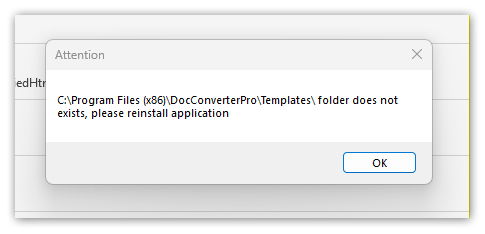
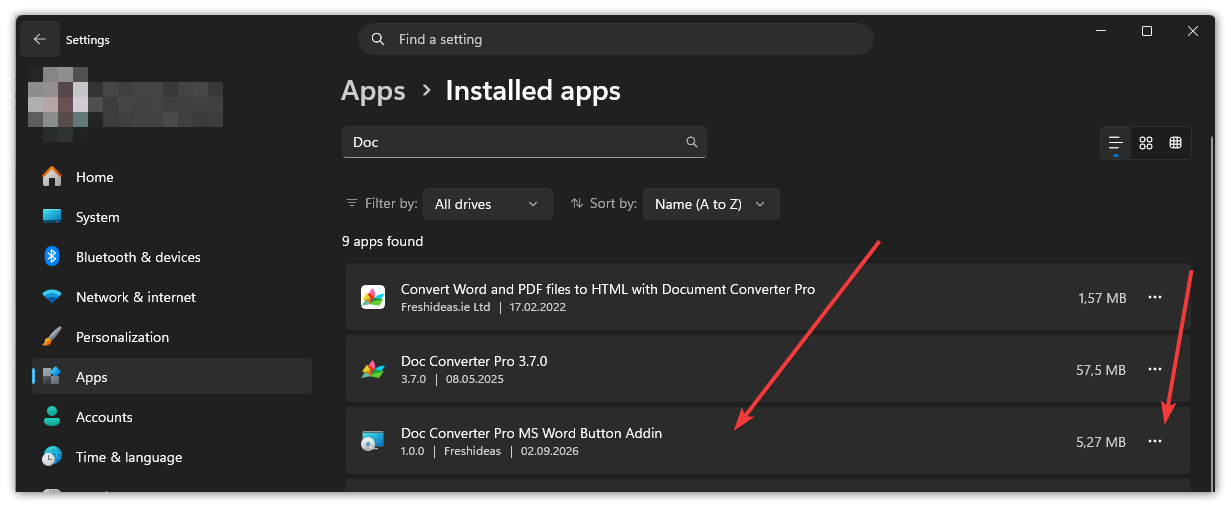
In the folder: C:\Program Files (x86)\DocConverterPro\ you will see a file called DocConverterPro.exe, this is the command-line application that has to be used to convert documents.

This is a Business version-only feature. You can upgrade from Personal to Business with a 50% discount. Email us for details: info@documentconverter.pro

How to use Doc Converter Pro from the command line to convert documents 

A command line has the following structure:

DocConverterPro.exe /t template /f file|folder [/m merge_output_format] [/q] [/r] [/o folder] [/of output_file_name.html] [/h] [/ctc]

Parameter List:

Parameter List:
/t “Convert to HTML” – template name
/f “Your document.docx” or “Folder name” – Required file name or folder to convert (works with /r option), example: \”C:\\Input\” (do not add last \\ char if you enclose folder name in quotes)
/m merge_output_format – Optional, specify merge files into one output document format: PDF, DOCX, RTF, TXT
/q – Optional, Quiet mode – no output command line information
/r – Optional, Include Sub-Folders

/isd – Optional, Include Sub-Folder path in output path, used only when /r option is used, default false
/o “Output directory”- Optional output directory – by default, the input file directory will be used
/of “Output file name.html” – Optional output file name – by default, the input file name will be used
/h – Optional, shows this help information
/ctc – Optional, copy converted HTML to the clipboard
/wait – Optional, do not close console window after conversion

Examples:

Example 1 – convert Example.doc with “Convert to HTML5” template to the current folder:
DocConverterPro.exe /t “Convert to HTML5” /f Example.doc

Example 2 – convert all supported files from the Docs folder with the template called “Convert to HTML5” to the “c:\” folder:
DocConverterPro.exe /r /t “Convert to HTML5” /o c:\ Docs

Example 3 – convert c:\Files\Example.doc with template called “Convert to HTML5”  to “c:\Output Folder” folder with “test .txt” file name:
DocConverterPro.exe /o “c:\Output Folder” /of test.txt /t “Convert to HTML5” /f “c:\Files\Example.doc”

Example 4 – convert Example.doc with “Convert to HTML5” template to the current folder, no command line messages will be shown:
DocConverterPro.exe /q /t “Convert to HTML5” /f Example.doc

Example 5 -merge File1.docx and File2.pdf file into one PDF document
DocConverterPro.exe /m pdf /f File1.docx File2.pdf

Please note that if you want to run DocConverterPro.exe from any script or app, you have to have the full path to DocConverterPro.exe as well as full paths to input/output documents that you want to convert.

You can use any conversion template you want from the templates that are shipped with the Doc Converter Pro app, or create your own customised conversion template.


In Windows command line prompt (cmd), typing: DocConverterPro.exe /h will give you the list of options in a new, separate console window, shown below.

Transfer your license to a new computer

Want to transfer your copy of Doc Converter Pro to a new computer? No problem. Just follow these simple steps.

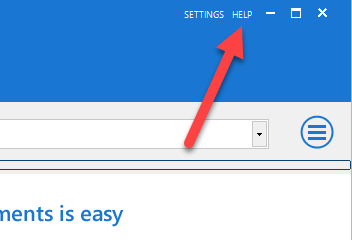
On your old machine open Doc Converter Pro and click on the help link on the top right:

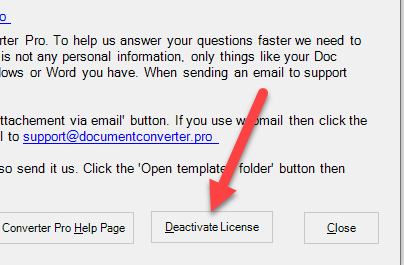
Then click on the deactivate License button:

On your new computer, all you have to do is download the trial version from our website then enter your serial in the trial version to activate it.

Any issues please contact support and we will be happy to help you out.

Support & feedback

Feel free to send us a support request at any time. You can visit our support area at: https://documentconverter.pro/ or email: info@documentconverter.pro

Need help? We can create your custom templates for you. Just tell us what you need it to do and we can code it. Basic advice is free, for more complex work there may be a small fee. Contact us for details.

Feedback and Suggestions

We welcome any feedback or suggestions you have about the Doc Converter Pro program. Unlike other software companies we actively respond to customer feedback, bugs are fixed within a few days of users informing us about them and if we like your feature suggestions then we usually implement these within a few weeks. Please send all comments to: info@documentconverter.pro

Thank you

We really appreciate the time you have taken to try our software, we really hope you like it.

Regular Expressions Support

The Doc Converter Pro template system supports regular expression commands (regex).

Regular expressions are very powerful, but they can be complex. For beginners, we recommend just using the standard template commands.

Note: it is important to note that we only support .NET regular expressions.

Generally, .NET expressions are the same as standard ones, but we recommend you look at some of these third-party sites for guidance on how to format commands.

http://www.regular-expressions.info/dotnet.html

http://regexlib.com/CheatSheet.aspx

http://www.google.com/search?hl=en&q=.net+regular+expressions