Skip to main content
How Can We Help?
All you need to do is add the files you want to merge to the file list on the main screen.
You can change the order of the files by clicking on the left of the file and dragging it up or down. Order is important as files will be merged in the order they are listed.

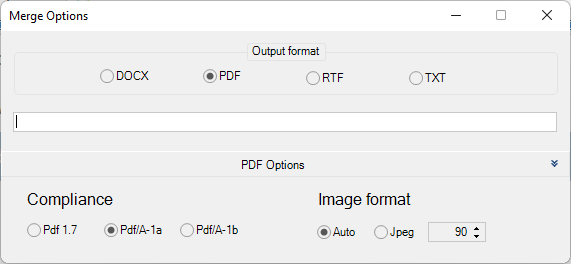
Once you are ready to merge just click the merge all button on the top menu. On the new screen, you can select the format you want to merge to. For example, you could merge 4 Word files into 1 PDF file.
You can also set the name for the merged file.

If you are merging to PDF you can click on PDF options at the bottom to get additional options.