- Custom Asset Folders for Fixed HTML: When converting PDF files into fixed layout HTML, all generated media assets—including images, fonts, and CSS stylesheets—can now be automatically grouped into a dedicated subfolder instead of crowding the main HTML directory. You can easily specify and configure your own custom asset folder paths.
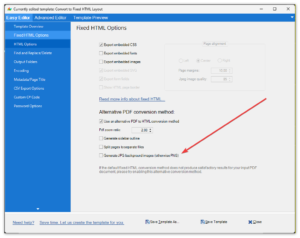
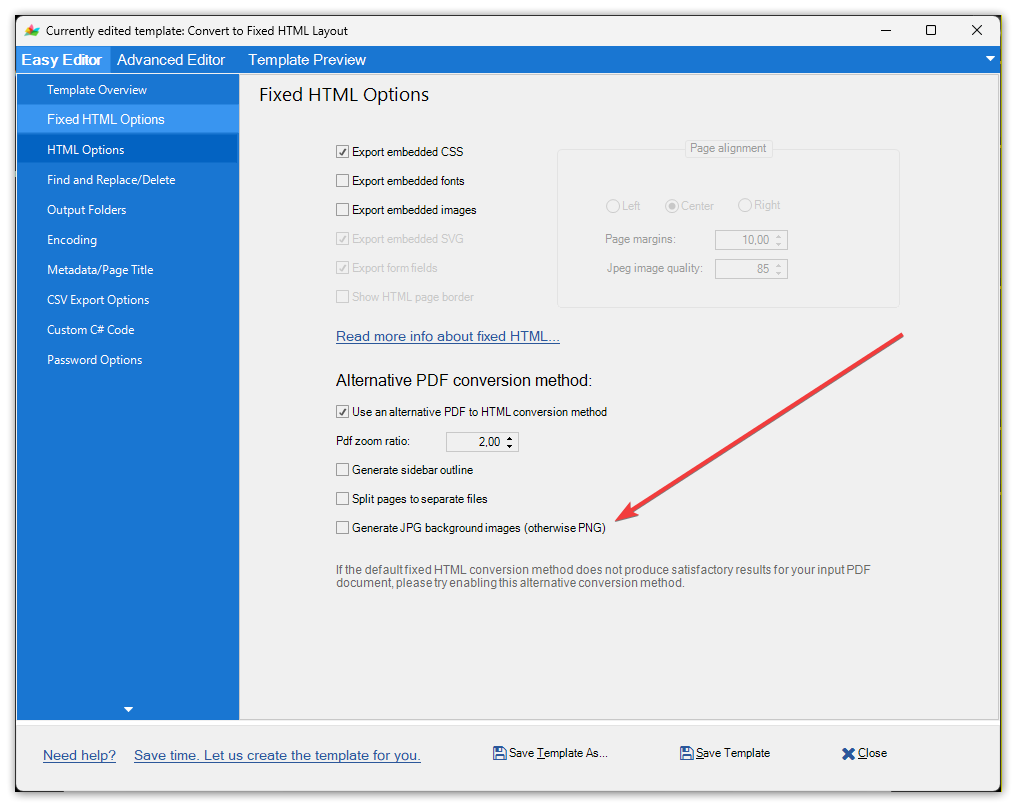
- Background Image Compression for Fixed HTML: In your fixed HTML options, you can now select JPG format for document background images to save web server space and optimize page loading times. This is highly useful if your source PDF contains complex graphics or heavy backgrounds. For standard documents, we still recommend using the default PNG image format.
- Zero-Crash PDF Exports: A single corrupted image inside a Word file can normally crash a bulk conversion queue. When exporting to PDF, our engine now automatically heals and reprocesses broken JPEGs on the fly so your batch jobs never hang.
- Pixel-Perfect Layout Fidelity: Multi-page tables now perfectly repeat header rows across page breaks, complex math formulas render flawlessly, and smart text hyphenation prevents alignment distortion across formats.
- Active Interactive Fields: Converted corporate forms stay alive. The application now fully preserves interactive date pickers, document links, and form field triggers during format shifts—fully compatible across standard PDF readers.
Doc Converter Pro version 4.0.0 released…
We’re excited to announce the latest major update to our software!
This version includes the following changes and improvements:
1) New PDF conversion “engine” to convert PDFs to “normal” HTML and fixed layout HTML. The previous conversion “engine” (legacy) can be used too, but we recommend using the new one.
2) Our internal conversion engine can find and replace text with regular expressions directly in DOCX, DOC, DOTX, EPUB, RTF, PDF, and Markdown documents. You can change or delete text content in Word documents directly.
3) The internal Doc Converter conversion engine can convert from and to Markdown format now:

4) You can now set input and output passwords for saved documents:
5) PDF 2.0 Compliance has been added:
6) You can convert documents with images to WebP format and set the quality of these images via the JPEG image quality option.

7) Other smaller document conversion fixes, performance enhancements, and updates to ensure a smoother, more reliable experience.
8) We have changed where templates and other application files are stored. From version 4, the app will store documents in \ProgramData\DocConverterPro\ – no modifiable files will be stored in the app installation folder. If you’re upgrading to version 4 from an older version, all your existing templates will be copied to the new location.
Also, we are introducing lower prices via subscriptions. Perpetual licenses are available, too. See our pricing page…
Download Doc Converter Pro version 4 now.
Doc Converter Pro version 3.7.0 released…
This version includes minor fixes, performance enhancements, and updates to document conversion features to ensure a smoother, more reliable experience.
Doc Converter Pro version 3.5.0 released…
This is an update with some fixes and document conversion updates. One of the biggest changes related to HTML conversion is how non-standard Word lists as converted to HTML. Since 3.5.0 version Doc Converter Pro will create non-standard Word lists with ul/ol/li tags and CSS counters. Previously these lists would be converted to HTML p/span tags only.
Doc Converter Pro Any CPU version 3.4.0 released…
This is an update with a significant change related to the app CPU support. From version 3.4.0 Doc Converter Pro will run as a 64-bit application on 64-bit Windows systems, so converting very big documents should not cause out-of-memory errors if your PC has more than 4GB of RAM. 32-bit Windows is also supported that’s why it’s any CPU build type. Also, some minor conversion fixes have been added as well.
Doc Converter Pro version 3.3.3 released…
This is an update with some minor fixes and document conversion updates.
Doc Converter Pro version 3.3.2 released…
This is an update with some minor fixes and document conversion updates.
Doc Converter Pro version 3.3.1 released…
This is an update with some minor document conversion updates. It is a free update for any version 3 customer.
Doc Converter Pro version 3.2.1 released…
The latest version of Doc Converter Pro is now available to download.
As well as the usual bug fixes and improvements we have added a new feature – ebook conversion.
You can now convert your documents to Epub ebook format.
To use it just select the Convert to Epub template or edit your template and tick Epub for the conversion format.
This is a free update for any version 3 customers. Just click the update option in the app.
Remember any version 1 or 2 customers (or Word Cleaner users) can upgrade to version 3 for half price.


