Bulk convert your documents in seconds on Windows
Batch convert your files offline into different formats. Word, PDF, HTML, Markdown, Open Doc and more.
Other versions: Online Web Application | Web API
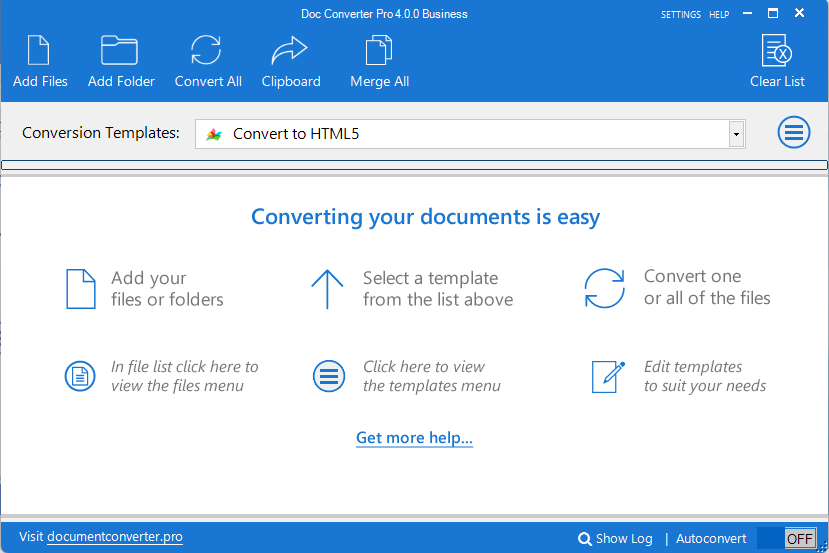

Fast Conversion
Convert one file or an entire folder. With an average conversion time of less than one second you will have your documents converted in no time.

Customizable
Create custom conversion templates to suit your needs. Full control over images, CSS, find and replace/delete and more. Share your templates with colleagues.

Flexible
Batch convert Word or PDF files to HTML and clean up the code. Convert Word to PDF, PDF to Word. Most document formats supported.
Watch Doc Converter Pro overview video

In development since 2003, our customers include:

Read these reviews from real customers:
All reviews Trustindex
 Capterra
 G2
G24.225 reviews
4.225 reviews
5.02 reviews
5.02 reviews
4.36 reviews
4.36 reviews
8.217 reviews
8.217 reviewsPosted on Trustindex Daniel25 April 2026Highly recommended I write letters in DOCX format and DocConverter Pro does a perfect job of converting them to HTML, including retaining images. It's wonderful software and I highly recommend it.Posted on Trustindex
 Kris C.20 February 2025Effortless File Conversion – Saves Time! With just a few clicks, I can convert multiple files while preserving their original format. The batch processing feature is a lifesaver! Whether converting PDFs, Word documents, or HTML files, this tool handles everything seamlessly.Posted on G2
 Manjil R.31 January 2022
Verified
Powerful software that can batch convert into multiple formats This software can batch convert multiple files into different file formats. The best part of this software is that it can merge multiple documents in one and has the ability to create and edit provided template format. Although this is powerful software, the price for this software is too high. $199 for a business license which converts to AUD 280, seems to be too expensive. If the price goes down, then obviously, many businesses will be purchasing this software. I am converting multiple file formats to PDF in one go which this software can efficiently perform, plus merging numerous documents in one file format. This software even can convert HTML to word and pdf to html.Posted on G2Sarwarna M.16 August 2021Verified
Change File Format Quickly On Windows Platform Doc Converter Pro is an online tool to convert Word format files into PDF. It supports all types of file formats and converts files easily to the required format. We can upload files, folders, and HTML files to change documents Format. The support team is very good at solving queries and helping to purchase software online. Overall found good software for business to represent reports in editable format. The desktop version is suitable for windows. We are waiting for mobile support so that it will be easier to use. We can easily convert files without changing the real format. It also provides advanced options before changing the format. We should go for Doc Converter Pro. The process of Doc Converter Pro is very fast. It takes very few seconds and converts whole documents. The quality of the business file is high and does not change in content. We can convert files to images, Pdf according to business needs. Doc Converter Pro is an important tool for small and medium size businesses. We have been using Doc Converter Pro for a long time, and the cost of this software is affordable for business. It has a complete set of functionalities for file changing.Posted on CapterraChristopher M.21 July 2021 Nice, easy and smart way of converting Overall: This is a nice, simple and easy to use conversion tool that saves time. Pros: This conversion tool is faster, it is a time-saving tool because it can process many pages at once. Cons: High price, can be a bit slow in behavior or stack when dealing with large filesPosted on G2
 Gerardo P.29 July 2019It is an excellent product, Doc Converter Pro is the solution to file conversion Doc Converter Pro is compatible with previous versions of PDF formats, so you can use all that you have created in previous versions of Adobe or other programs. I like that you have a tool to select the range of pages to convert. What I like most is that it is very fast and does not alter its performance even though it places a large number of files in the converter. I must also emphasize that I can integrate this software with Microsoft Office to enter directly from Office and convert my files through a button provided by the program. I would like the interface to be more intuitive and give more details about the documents I want to convert, for example, it does not show me the number of pages of the document or if it is protected or not. I would also like you to indicate the metadata as author, year of creation and others. It is a very easy to use file converter. If you previously had to create documents in different formats, Doc Converter Pro is the solution. If you are concerned about the quality of the documents, I must emphasize that it is a program that I have been using for several years and the document always remains original. Microsoft Office only has the ability to convert Word files to PDF, so with this tool I can convert Word to PDF or vice versa. In addition, it also supports other as ODT or TXT formats. For the moment, it has saved me a lot of time because I previously had to create documents in both formats which took a lot of time and the margins and font size never looked the same to me.Posted on Capterra
 Michelle R.25 July 2019
 Good Product Pros: Easy to use. I use this one primarily at home and another one that is authorized at work. I can not say I prefer one to the other as they are both good. Cons: It took me awhile to figure out what to do, but I am not the most computer savvy.Posted on G2
 Ezequiel Z.6 June 2019A software with many options to convert Doc Converter Pro has a great variety of formats for conversion such as Word, HTML, Excel, PowerPoint, RTF and TXT. It has an autoconversion option and allows you to add a button to Microsoft Office. The software is really expensive if we consider that some conversion options are free online. It has conversion options of the best known formats in the digital world, great option. We take advantage of the conversion in terms of HTML format where this software has its strong point.Posted on CapterraMichael C.1 June 2019Word Cleaner Overall: I feel like its smooth software and has saved me much time Pros: This software turns a tedious task into something simple and fun Cons: The only shortcoming I see is that with large files it takes longerPosted on G2
 Josue R.20 May 2019A conversion tool for businesses Doc Converter Pro has a wide variety of formats to convert, a clean interface and an indeterminate number of files for conversion. It does not have encryption services nor the possibility of signing documents. This software is a convenient tool for converting PDF files to other formats at a great price. This software allows us to convert single file or multiple files at the same time without using so many computer resources.Posted on G2
 Daniel P.23 April 2019Doc Converter Pro is fast and reliable This software converts files to PDF as well as PDF files to other formats. It is easy to use and installation is fast. The customer service is friendly. Loading batch files fails when the documents have the same name and different format. It is an easy to use, fast software to convert and supports batch documents. We usually convert a large amount of PDF files daily and doing it directly from Microsoft Office was very tedious, so Doc Converter Pro solved our problem.Posted on G2
 Roger R.14 April 2019Excellent tool to convert PDF files to other formats The application is efficient and easy to use for converting PDF files. Doc Converter Pro is well designed and with intuitive program interface. I could convert most, if not all of the formats you are in need of. It has a deficiency for fully converting images in text and total extraction of objects from some file. I believe that this software does an amazing job and I recommend it. With Doc Converter Pro, we convert pdf documents that are difficult for us to edit in order to make the corresponding modifications.Posted on G2
 Alvaro R.10 April 2019A great experience with this software It has an easy-to-understand user interface. For me it is important that I can convert several files at once and this software makes it possible. The final files after the conversion are of high quality. The automatic conversion button does not work, you have to do it manually. Doc Converter Pro is a professional PDF conversion application of the best in the market. For storing and sharing documents, PDF is the best format by far, so we must convert all our files to PDF with Doc Converter Pro.Posted on G2
 Juan S.1 April 2019Easy to use and constantly improving I like the software for its ease of use. The interface is simple and straightforward. As a person who gets a lot of PDF reports that need to be converted, Doc Converter Pro allows me to change the format to my documents. Does not recognize 'headers' in tables in documents resulting in need to manually adjust format. Intuitive and very user friendly for all sorts of requirements. The product has continually become more versatile. I use often use this app for technological reports. These papers need to be available in different formats.Posted on G2
 Gustavo T.24 March 2019An excellent but expensive software Doc Converter Pro is a tool that has the most commonly used formats. You can convert several documents at once with just one click. In my opinion, the functions in the interface are well located so that it is not difficult to learn how to use the application. The truth is that it seems to me exaggerated that the business license costs $ 199 per user, when there are free softwares that also convert those same formats. I think there are cheaper options, but Doc Converter Pro has a lot of quality. We use Doc Converter Pro in our organization to convert the documents in different formats, so that higher charges have a greater choice when reviewing our documentation.Posted on Capterra
 Jake E.5 December 2018Word Cleaner Pros: The easy to use structure of the software. I am not tech-savvy and I was able to figure it out. Cons: The batch convert was easy to use but the speed at which it was done was slower than I expected.Posted on Capterra
 Volodymyr B.3 September 2018No-nonsense Converting tool Tool Overall: Nice and simple converting tool. Does its job well, always delivers. Easy to use. Pros: As far as text converting tools go - this one is probably the smoothest of all i've worked with for a long time. In fact, there is not much to talk about - Word Cleaner is working very well and if you need to convert lots of files nice and clean - then this is the tool of choice. UI is easy to follow and you don't need to wonder what does what and how - it is all comprehensible. Cons: From the technical standpoint - sometimes it can stuck with the big files. Otherwise, it works smoothly and barely if ever starts to drag. From the business standpoint - it is expensive andPosted on Capterra
 Lucía O.18 June 2018It has helped me to save a lot of time! Overall: It has saved me a lot of time Pros: It helps to save a lot of time, since it can process many pages at once. It has allowed me to convert Word files to PDF or HTML. It's easy to use. Cons: Its price is high. Sometimes it can work a little slow. But I really do not have other complaints or negative comments about its operation

Buy desktop version - Choose your edition
The trial version has all features enabled. However, when you purchase it, you will only receive the features included in the selected edition.
We also have a Web App and Web API | You can also upgrade from Word Cleaner or Doc Converter Pro Version 1-3

Personal
Licenses are per user.
Features of the Personal Edition:
Edit and create your own conversion templates to suit your needs.
Free basic support.

Business
Licenses are per user.
Unique features of the Business Edition:
Command-line support for automating conversions
Faster conversions – convert files in parallel
Export to database – bulk import into a CMS
Custom C# support – more powerful templates
Premium support, including phone support

Buy Doc Converter Pro risk free...
We are so confident that you will love Doc Converter Pro that we offer a 14-day money back guarantee.

Frequently Asked Questions
Everything you need to know about Doc Converter Pro — the batch document conversion software for Windows.
What is Doc Converter Pro?
Doc Converter Pro is a Windows desktop application for bulk converting documents between multiple formats. It supports Word (DOCX/DOC), PDF, HTML, RTF, ODT, Markdown, plain text, and image files. Developed since 2003 by Freshideas.ie Ltd (Belfast, UK/Ireland), it is one of the most established document conversion tools available.
What file formats does Doc Converter Pro support?
Doc Converter Pro supports a wide range of conversion paths, including:
- Word (DOCX/DOC) to HTML, PDF, Markdown, plain text, or image files
- PDF to HTML, Word, plain text, or image files
- Open Doc (ODT) to HTML or PDF
- Markdown to Word
- Image files to PDF
How does batch conversion work?
Add your files or an entire folder to the program, choose a conversion template, and click "Convert All". The app processes everything automatically. With an average conversion time of under one second per file, large batches complete in seconds.
Can I convert files directly from Windows Explorer?
Yes. Doc Converter Pro integrates with Windows Explorer. Right-click any supported file to convert it without opening the main application. For example, right-click a Word document, choose to convert it to HTML, and the output is placed on your clipboard — all in a single click.
Can I convert documents directly from inside Microsoft Word?
Yes. An optional MS Word toolbar add-in is included. Once installed, you can convert the document you are actively editing to HTML or other formats without leaving Word.
What are conversion templates and can I customise them?
Conversion templates define exactly how your documents are converted — controlling images, CSS, HTML code output, and find-and-replace rules. The program ships with a full set of built-in templates. You can edit any template or create new ones using the built-in template editor. Finished templates can be saved for reuse or shared with colleagues.
What are the system requirements?
Doc Converter Pro requires:
- Operating system: Windows 10 or newer
- Runtime: Microsoft .NET Framework 4.8 (pre-installed on current Windows 10/11)
If .NET 4.8 is not already installed, the installer will guide you through the process.
Is there a free trial?
Yes. A free trial is available at documentconverter.pro. The trial has all features enabled, so you can test the full software before deciding to purchase.
What editions are available and what are the differences?
Two editions are available (both licensed per user):
- Personal Edition: Custom template creation, free basic support.
- Business Edition: Everything in Personal, plus command-line automation, parallel (faster) conversions, database/CMS bulk export, custom C# template support, and premium phone support.
Is there a money-back guarantee?
Yes. Doc Converter Pro comes with a 14-day money-back guarantee. If you are not satisfied, you can request a full refund within 14 days of purchase.
Is there a web or API version available?
Yes. Beyond the Windows app, Doc Converter Pro is offered as:
- Web App — convert in any browser at docconverter.pro
- Web API — integrate document conversion into your own application at api.docconverter.pro
How long has Doc Converter Pro been available?
The product has been in continuous development since 2003. Originally launched as Word Cleaner (a Word-to-HTML converter), it was rebranded as Doc Converter Pro in 2017 when support for PDF, RTF, ODT, and other formats was added. The latest release, Version 4, launched in June 2026.
Where can I download older versions of Doc Converter Pro?
Download old versions of Doc Converter Pro:
Doc Converter Pro Version 1.3
Doc Converter Pro Version 2.3
Doc Converter Pro Version 3.7