This is mostly a performance update. It is a free update for any version 3 customers. Just click the update option in the app.
Remember any version 1 or 2 customers (or Word Cleaner users) can upgrade to version 3 for half price.
This is mostly a performance update. It is a free update for any version 3 customers. Just click the update option in the app.
Remember any version 1 or 2 customers (or Word Cleaner users) can upgrade to version 3 for half price.

We are pleased to release version 3 of Doc Converter Pro! This release brings lots of new features as well as overall improvements.
Doc Converter Pro can now convert PDF files to DOCX, RTF, ODT, DOC, TXT and Images.
When it comes to converting PDF files to HTML you have two options:

Want to merge some documents together? No problem. With version 3 you can do this will 2 clicks.
You can merge the following formats DOCX, PDF, RTF, TXT, JPG/PNG into one DOCX, PDF, RTF or TXT document. This is not just for text documents, you can also merge image files into one PDF, DOCX or RTF file.
Note: the merge feature does not use conversion templates at all. It’s a separate feature. We also have extra merge options for PDF files:

How to use the merge feature:
Doc Converter Pro can now either compress or indent (prettify) HTML output at the very end of the conversion process. Compression helps to reduce the size of your HTML files, and indenting makes your HTML more readable. By default, these options are turned off.

You can now set a custom image files prefix when converting your documents to HTML. For for example if you want all your images to have the prefix about eg about_3.png then you would enter about in the options box. By default, the image file names are based on the input document file name.

Command-line mode is a feature of our business edition. It lets you automate your conversions.
To merge your documents into one use the following switch – /m pdf/docx/rtf/txt so for example to merge to a PDF file it would be /m pdf
If you want to convert more than one input files use the switch – /f file1 file2 file3 for example /f about.doc contact.doc
We have added a /wait switch if you want to keep the console window open after a conversion. This is useful to check error messages.
Any existing Word Cleaner or Document Converter Pro user can upgrade to version 3 for half price. Click here now to upgrade.
We are pleased to release the next version of Doc Converter Pro. There are some new features in this release in addition to the usual bug fixes and optimisations.
New feature: Custom page options for PDF, DOCX/DOC, RTF, ODT output formats:
We have added controls for you to set custom page margins sizes, document size, and page orientation. These can be very useful when converting to PDF.

New feature: User can specify how many times given find and replace will occur.
This is more for power users. It lets you have more control over find and replace commands. For instance below value 1 will mean that only first <p…>…</p> occurence will be replaced with <xxx>….</xxx> example tag.

To update your version just download and install the trial.
These new features were suggested by users, if you have a feature suggestion for us please send it to info@documentconverter.pro
We are pleased to announce the next version of Doc Converter Pro – Version 2.2
This is mostly a bug fix and optimisation release. You can download it here.
To update just download the trial version and install it.
We are pleased to announce the next version of Doc Converter Pro – Version 2.1.
CSS styles to keep or remove from HTML:

Images absolute or relate URL:
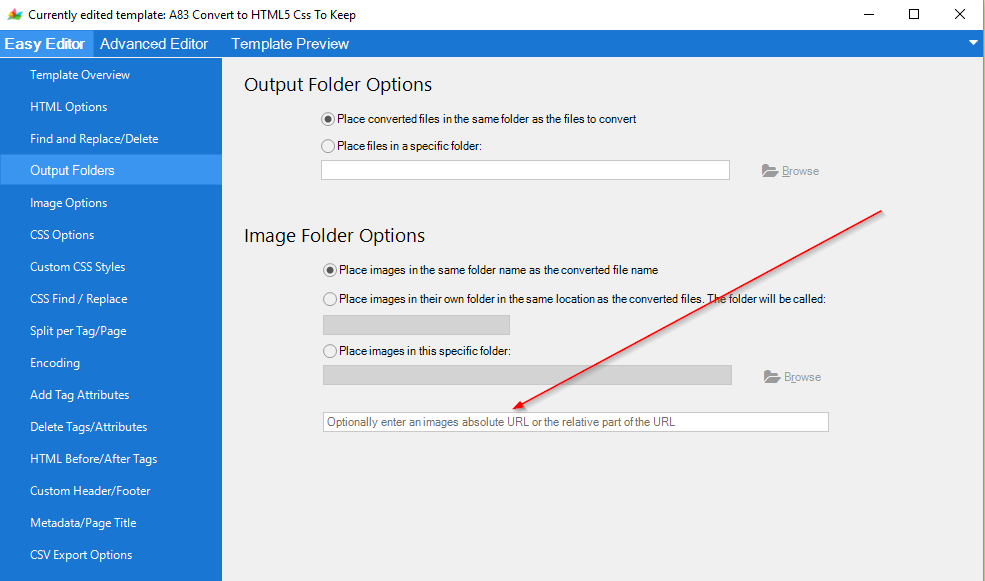
Lots of conversion bug fixes related to different output formats.
We are pleased to announce the next major version of Doc Converter Pro – Version 2.
The main new feature is command line support to automate your conversions.
With Doc Converter Pro you can convert documents via command line, shell scripts or from any external application. You can use templates that are shipped with Doc Converter Pro or create your own custom templates that meet all your requirements.
In the folder: C:\Program Files (x86)\DocConverterPro\ you will see a file called DocConverterPro.exe, this is the command line application that has to be used to convert documents.
In Windows command line mode typing: DocConverterPro.exe /h will give you the list of options:

Other new features include various performance optimisations and bug fixes.
Any existing Doc Converter Pro user can upgrade to version 2 for 50% off. Just email us: info@documentconverter.pro and we will send you a discount code.
We are pleased to announce the release of Doc Converter Pro Version 1.3
This is mainly a bug fix release but we recommend users update.
This is a free update for any existing Doc Converter Pro users.
To update just download the trial version and install it.
We are pleased to announce the release of Doc Converter Pro Version 1.2.5.
This is mainly a bug fix release but we recommend users update.
This is a free update for any existing Doc Converter Pro users.
To update just download the trial version and install it.
We are pleased to release version 1.2.2 of Doc Converter Pro. This is mainly a bug fix and optimisation release. To upgrade just download and install the trial version.
We are pleased to release version 1.1 of Doc Converter Pro. This is mainly a bug fix and optimisation release. To upgrade just download and install the trial version.
