We’re excited to announce the latest update to our software!
While we recently rolled out major front-end features in version 4.0.0, we have also updated our core internal conversion engine to ensure a smoother, more reliable experience.
This update includes the following backend performance enhancements, new features, and fixes:
- Custom Asset Folders for Fixed HTML: When converting PDF files into fixed layout HTML, all generated media assets—including images, fonts, and CSS stylesheets—can now be automatically grouped into a dedicated subfolder instead of crowding the main HTML directory. You can easily specify and configure your own custom asset folder paths.
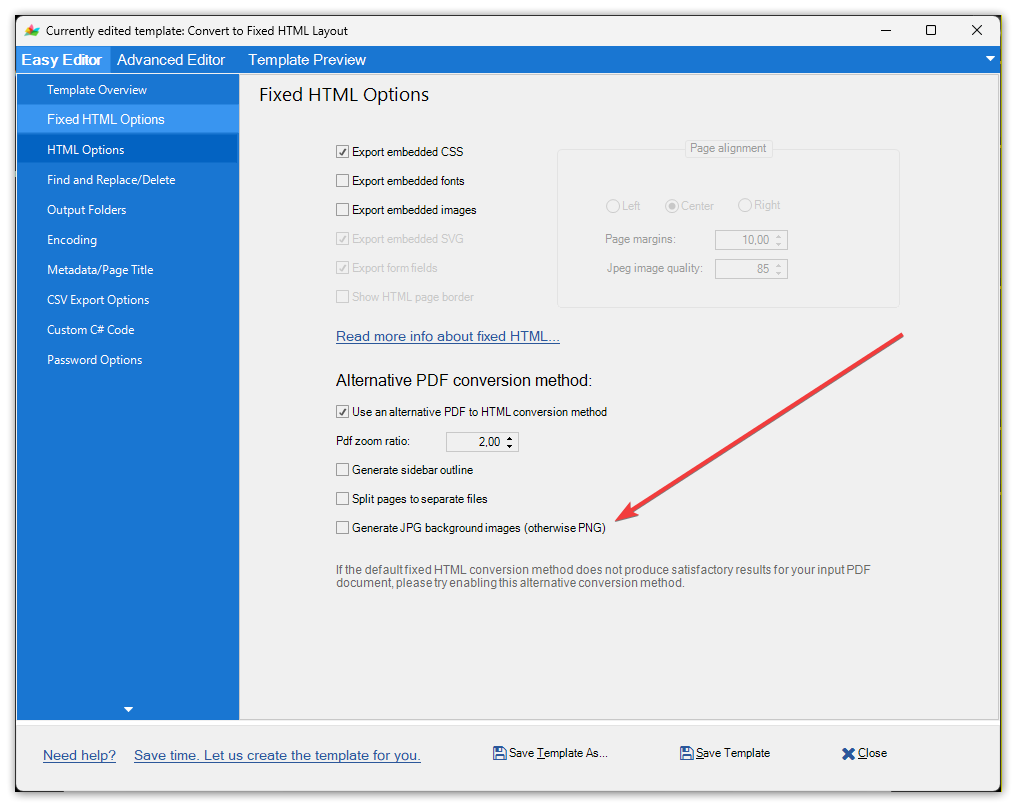
- Background Image Compression for Fixed HTML: In your fixed HTML options, you can now select JPG format for document background images to save web server space and optimize page loading times. This is highly useful if your source PDF contains complex graphics or heavy backgrounds. For standard documents, we still recommend using the default PNG image format.
- Zero-Crash PDF Exports: A single corrupted image inside a Word file can normally crash a bulk conversion queue. When exporting to PDF, our engine now automatically heals and reprocesses broken JPEGs on the fly so your batch jobs never hang.
- Pixel-Perfect Layout Fidelity: Multi-page tables now perfectly repeat header rows across page breaks, complex math formulas render flawlessly, and smart text hyphenation prevents alignment distortion across formats.
- Active Interactive Fields: Converted corporate forms stay alive. The application now fully preserves interactive date pickers, document links, and form field triggers during format shifts—fully compatible across standard PDF readers.
This is a free update for any version 4 customer. Just click the update option in the app.